运行项目
1、获取项目源码
克隆代码,后端项目位于Admin.Core\src文件夹内
git clone https://github.com/zhontai/Admin.Core.gitgit clone https://gitee.com/zhontai/Admin.Core.git注意:
克隆代码时,请确保目标路径中不包含任何特殊字符(如空格、中文、标点符号等)。建议使用纯英文、数字和下划线(_)组合的路径名称。例如:
错误示例 C:/My Projects/代码仓库/
正确示例 C:/my_projects/code_repo/
这样可以避免因路径问题导致的程序运行错误。
2、安装 VS 工具
通过 VS 配置 后,双击运行Admin.Core\src\ZhonTai.sln中台项目
3、运行项目
Tye 运行多个项目
1、安装Tye
dotnet tool install -g Microsoft.Tye --version "0.12.0-*" --add-source https://pkgs.dev.azure.com/dnceng/public/_packaging/dotnet6/nuget/v3/index.json2、安装EasyRun
点击顶部菜单栏:拓展 -> 管理拓展 -> 浏览选项卡搜索EasyRun点击安装
3、配置EasyRun
模板项目,在01.SlnFiles/MyCompanyName.MyProjectName.sln.EasyRun.json中配置
MyCompanyName.MyProjectName.sln.EasyRun.json
{
  "SettingsId": "2b14968a-f3ca-4849-bcad-5d4f210d2960",
  "Profiles": [
    {
      "Name": "Default",
      "LoggingTargetType": 0,
      "LoggingPath": "./.logs",
      "LoggerUrl": null,
      "UseTye": true,
      "TyePort": 10000,
      "Filter": ".Host",
      "Services": [
        {
          "ServiceType": 0,
          "Name": "MyCompanyName.MyGateway.Host",
          "TyeName": null,
          "ProjectFile": "gateways\\MyCompanyName.MyGateway\\MyCompanyName.MyGateway.Host.csproj",
          "DefaultSelected": true,
          "Bindings": "::16010",
          "Arguments": null,
          "EnvVariables": null,
          "Replicas": 1
        },
        {
          "ServiceType": 0,
          "Name": "MyCompanyName.MyIMServer.Host",
          "TyeName": null,
          "ProjectFile": "modules\\im\\MyCompanyName.MyIMServer\\MyCompanyName.MyIMServer.Host.csproj",
          "DefaultSelected": true,
          "Bindings": "::17010",
          "Arguments": null,
          "EnvVariables": null,
          "Replicas": 1
        },
        {
          "ServiceType": 0,
          "Name": "MyCompanyName.MySys",
          "TyeName": null,
          "ProjectFile": "modules\\sys\\MyCompanyName.MySys\\MyCompanyName.MySys.Host.csproj",
          "DefaultSelected": true,
          "Bindings": "::18010",
          "Arguments": null,
          "EnvVariables": null,
          "Replicas": 1
        },
        {
          "ServiceType": 0,
          "Name": "MyCompanyName.MyBiz",
          "TyeName": null,
          "ProjectFile": "modules\\biz\\MyCompanyName.MyBiz\\MyCompanyName.MyBiz.Host.csproj",
          "DefaultSelected": true,
          "Bindings": "::19010",
          "Arguments": null,
          "EnvVariables": null,
          "Replicas": 1
        },
        {
          "ServiceType": 0,
          "Name": "MyCompanyName.MyMem",
          "TyeName": null,
          "ProjectFile": "modules\\mem\\MyCompanyName.MyMem\\MyCompanyName.MyMem.Host.csproj",
          "DefaultSelected": true,
          "Bindings": "::20010",
          "Arguments": null,
          "EnvVariables": null,
          "Replicas": 1
        }
      ]
    }
  ]
}源码项目,在01.sln/ZhonTai.sln.EasyRun.json中配置
ZhonTai.sln.EasyRun.json
{
  "SettingsId": "2b14968a-f3ca-4849-bcad-5d4f210d2960",
  "Profiles": [
    {
      "Name": "Default",
      "LoggingTargetType": 0,
      "LoggingPath": "./.logs",
      "LoggerUrl": null,
      "UseTye": true,
      "TyePort": 10000,
      "Filter": ".Host",
      "Services": [
        {
          "ServiceType": 0,
          "Name": "ZhonTai.Gateway.Yarp.Host",
          "TyeName": null,
          "ProjectFile": "gateways\\ZhonTai.Gateway.Yarp.Host\\ZhonTai.Gateway.Yarp.Host.csproj",
          "DefaultSelected": true,
          "Bindings": "::16010",
          "Arguments": null,
          "EnvVariables": null,
          "Replicas": 1
        },
        {
          "ServiceType": 0,
          "Name": "ZhonTai.IMServer.Host",
          "TyeName": null,
          "ProjectFile": "modules\\im\\ZhonTai.IMServer.Host\\ZhonTai.IMServer.Host.csproj",
          "DefaultSelected": true,
          "Bindings": "::17010",
          "Arguments": null,
          "EnvVariables": null,
          "Replicas": 1
        },
        {
          "ServiceType": 0,
          "Name": "ZhonTai.Admin.Host",
          "TyeName": null,
          "ProjectFile": "modules\\admin\\ZhonTai.Admin.Host\\ZhonTai.Admin.Host.csproj",
          "DefaultSelected": true,
          "Bindings": "::18010",
          "Arguments": null,
          "EnvVariables": null,
          "Replicas": 1
        },
        {
          "ServiceType": 0,
          "Name": "ZhonTai.Module.Dev.Host",
          "TyeName": null,
          "ProjectFile": "modules\\dev\\ZhonTai.Module.Dev\\ZhonTai.Module.Dev.Host\\ZhonTai.Module.Dev.Host.csproj",
          "DefaultSelected": true,
          "Bindings": "::18020",
          "Arguments": null,
          "EnvVariables": null,
          "Replicas": 1
        }
      ]
    }
  ]
}
4、打开EasyRun
点击顶部菜单栏:视图 -> 其他窗口 -> EasyRun,打开EasyRun窗口
5、运行项目
在EasyRun选项卡勾选要运行的项目,点击Tye按钮运行,再次点击Tye按钮停止运行 
运行成功后会自动打开cmd窗口,并出现以下提示则表示运行成功 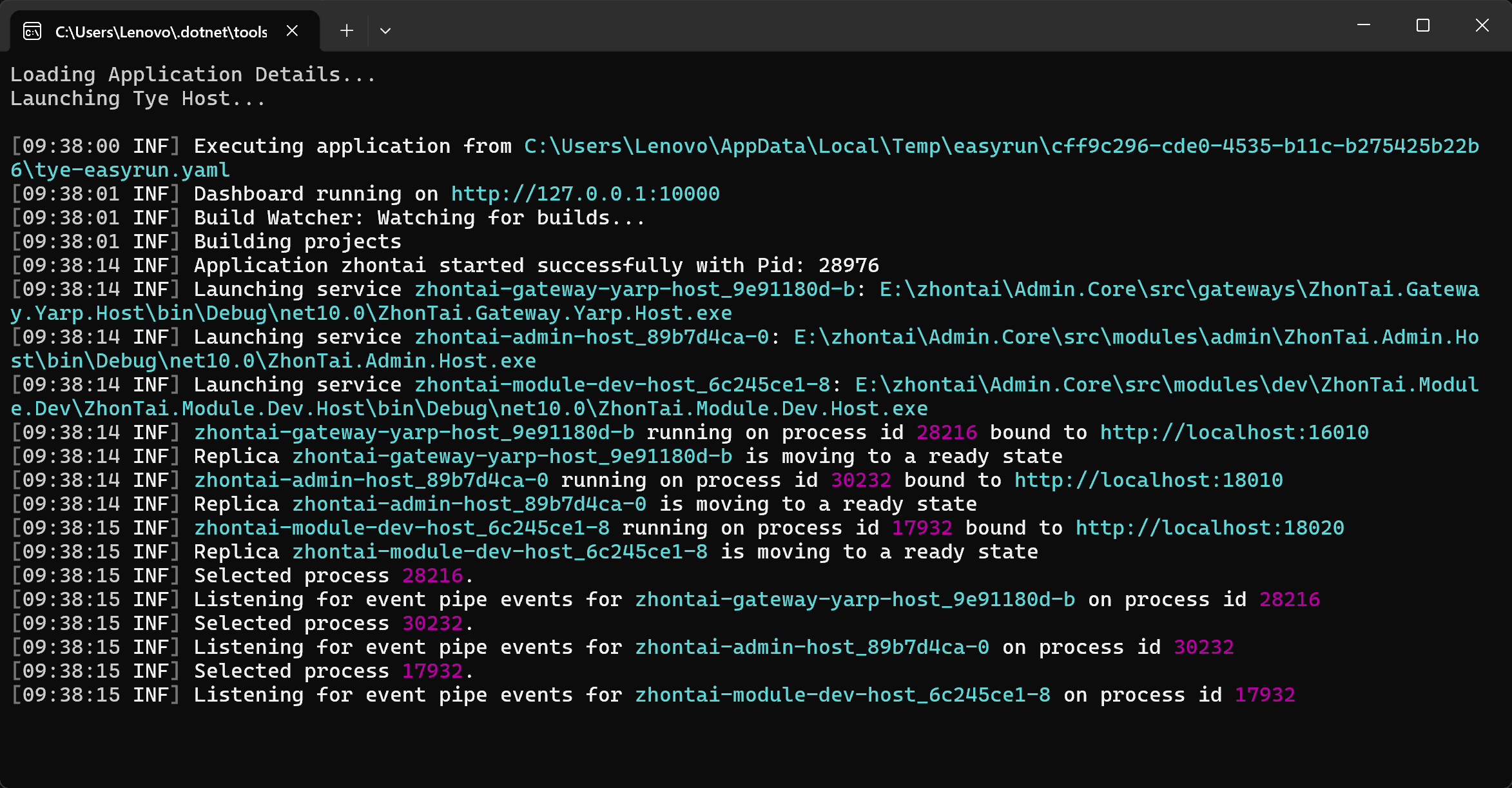
访问http://127.0.0.1:10000,可查看zhontai-admin-host项目运行日志
调试项目
在EasyRun选项卡运行的项目中,选择要调试的项目点击Debugger按钮开启调试
VS 运行多个项目
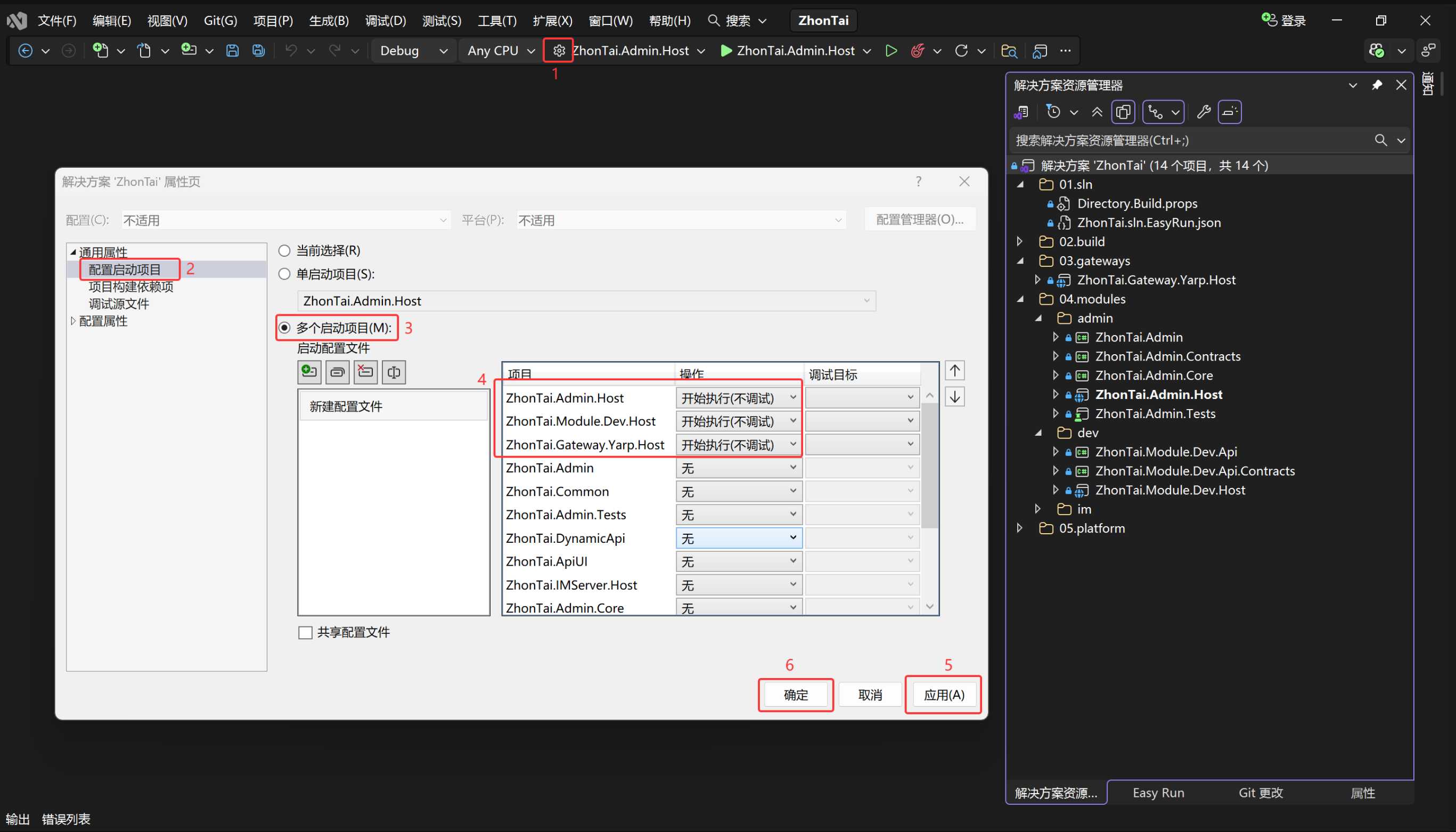
不使用EasyRun运行项目时, 需要通过VS工具栏手动配置多个启动项目
按下图配置后,按Ctrl + F5开始执行(不调试)多个项目