Run Project
1. Get Project Source Code
Clone the code. The backend project is located in the Admin.Core\src folder.
git clone https://github.com/zhontai/Admin.Core.gitgit clone https://gitee.com/zhontai/Admin.Core.gitNote:
When cloning code, make sure the target path does not contain any special characters (such as spaces, Chinese characters, punctuation marks, etc.). It is recommended to use a path consisting only of English letters, numbers, and underscores (_). For example:
Incorrect: C:/My Projects/code-repo/
Correct: C:/my_projects/code_repo/
This avoids runtime errors caused by path issues.
2. Install VS Tools
After completing the VS Configuration, double-click to open the Admin.Core\src\ZhonTai.sln Admin project
3. Run Project
Running Multiple Projects with Tye
- Install Tye
dotnet tool install -g Microsoft.Tye --version "0.12.0-*" --add-source https://pkgs.dev.azure.com/dnceng/public/_packaging/dotnet6/nuget/v3/index.jsonInstall EasyRun
Click the top menu: Extensions -> Manage Extensions -> Browse tab, search for EasyRun and click InstallConfigure EasyRun
For template projects, configure in01.SlnFiles/MyCompanyName.MyProjectName.sln.EasyRun.json
MyCompanyName.MyProjectName.sln.EasyRun.json
{
  "SettingsId": "2b14968a-f3ca-4849-bcad-5d4f210d2960",
  "Profiles": [
    {
      "Name": "Default",
      "LoggingTargetType": 0,
      "LoggingPath": "./.logs",
      "LoggerUrl": null,
      "UseTye": true,
      "TyePort": 10000,
      "Filter": ".Host",
      "Services": [
        {
          "ServiceType": 0,
          "Name": "MyCompanyName.MyGateway.Host",
          "TyeName": null,
          "ProjectFile": "gateways\\MyCompanyName.MyGateway\\MyCompanyName.MyGateway.Host.csproj",
          "DefaultSelected": true,
          "Bindings": "::16010",
          "Arguments": null,
          "EnvVariables": null,
          "Replicas": 1
        },
        {
          "ServiceType": 0,
          "Name": "MyCompanyName.MyIMServer.Host",
          "TyeName": null,
          "ProjectFile": "modules\\im\\MyCompanyName.MyIMServer\\MyCompanyName.MyIMServer.Host.csproj",
          "DefaultSelected": true,
          "Bindings": "::17010",
          "Arguments": null,
          "EnvVariables": null,
          "Replicas": 1
        },
        {
          "ServiceType": 0,
          "Name": "MyCompanyName.MySys",
          "TyeName": null,
          "ProjectFile": "modules\\sys\\MyCompanyName.MySys\\MyCompanyName.MySys.Host.csproj",
          "DefaultSelected": true,
          "Bindings": "::18010",
          "Arguments": null,
          "EnvVariables": null,
          "Replicas": 1
        },
        {
          "ServiceType": 0,
          "Name": "MyCompanyName.MyBiz",
          "TyeName": null,
          "ProjectFile": "modules\\biz\\MyCompanyName.MyBiz\\MyCompanyName.MyBiz.Host.csproj",
          "DefaultSelected": true,
          "Bindings": "::19010",
          "Arguments": null,
          "EnvVariables": null,
          "Replicas": 1
        },
        {
          "ServiceType": 0,
          "Name": "MyCompanyName.MyMem",
          "TyeName": null,
          "ProjectFile": "modules\\mem\\MyCompanyName.MyMem\\MyCompanyName.MyMem.Host.csproj",
          "DefaultSelected": true,
          "Bindings": "::20010",
          "Arguments": null,
          "EnvVariables": null,
          "Replicas": 1
        }
      ]
    }
  ]
}
For source code projects, configure in 01.sln/ZhonTai.sln.EasyRun.json
ZhonTai.sln.EasyRun.json
{
  "SettingsId": "2b14968a-f3ca-4849-bcad-5d4f210d2960",
  "Profiles": [
    {
      "Name": "Default",
      "LoggingTargetType": 0,
      "LoggingPath": "./.logs",
      "LoggerUrl": null,
      "UseTye": true,
      "TyePort": 10000,
      "Filter": ".Host",
      "Services": [
        {
          "ServiceType": 0,
          "Name": "ZhonTai.Gateway.Yarp.Host",
          "TyeName": null,
          "ProjectFile": "gateways\\ZhonTai.Gateway.Yarp.Host\\ZhonTai.Gateway.Yarp.Host.csproj",
          "DefaultSelected": true,
          "Bindings": "::16010",
          "Arguments": null,
          "EnvVariables": null,
          "Replicas": 1
        },
        {
          "ServiceType": 0,
          "Name": "ZhonTai.IMServer.Host",
          "TyeName": null,
          "ProjectFile": "modules\\im\\ZhonTai.IMServer.Host\\ZhonTai.IMServer.Host.csproj",
          "DefaultSelected": true,
          "Bindings": "::17010",
          "Arguments": null,
          "EnvVariables": null,
          "Replicas": 1
        },
        {
          "ServiceType": 0,
          "Name": "ZhonTai.Admin.Host",
          "TyeName": null,
          "ProjectFile": "modules\\admin\\ZhonTai.Admin.Host\\ZhonTai.Admin.Host.csproj",
          "DefaultSelected": true,
          "Bindings": "::18010",
          "Arguments": null,
          "EnvVariables": null,
          "Replicas": 1
        },
        {
          "ServiceType": 0,
          "Name": "ZhonTai.Module.Dev.Host",
          "TyeName": null,
          "ProjectFile": "modules\\dev\\ZhonTai.Module.Dev\\ZhonTai.Module.Dev.Host\\ZhonTai.Module.Dev.Host.csproj",
          "DefaultSelected": true,
          "Bindings": "::18020",
          "Arguments": null,
          "EnvVariables": null,
          "Replicas": 1
        }
      ]
    }
  ]
}
Open EasyRun
Click the top menu:View-> Other Windows -> EasyRun to open the EasyRun windowRun Project
In theEasyRuntab, check the projects you want to run, click theTyebutton to start, click theTyebutton again to stop
After successful startup, a cmd window will open automatically. The following prompt indicates successful startup: 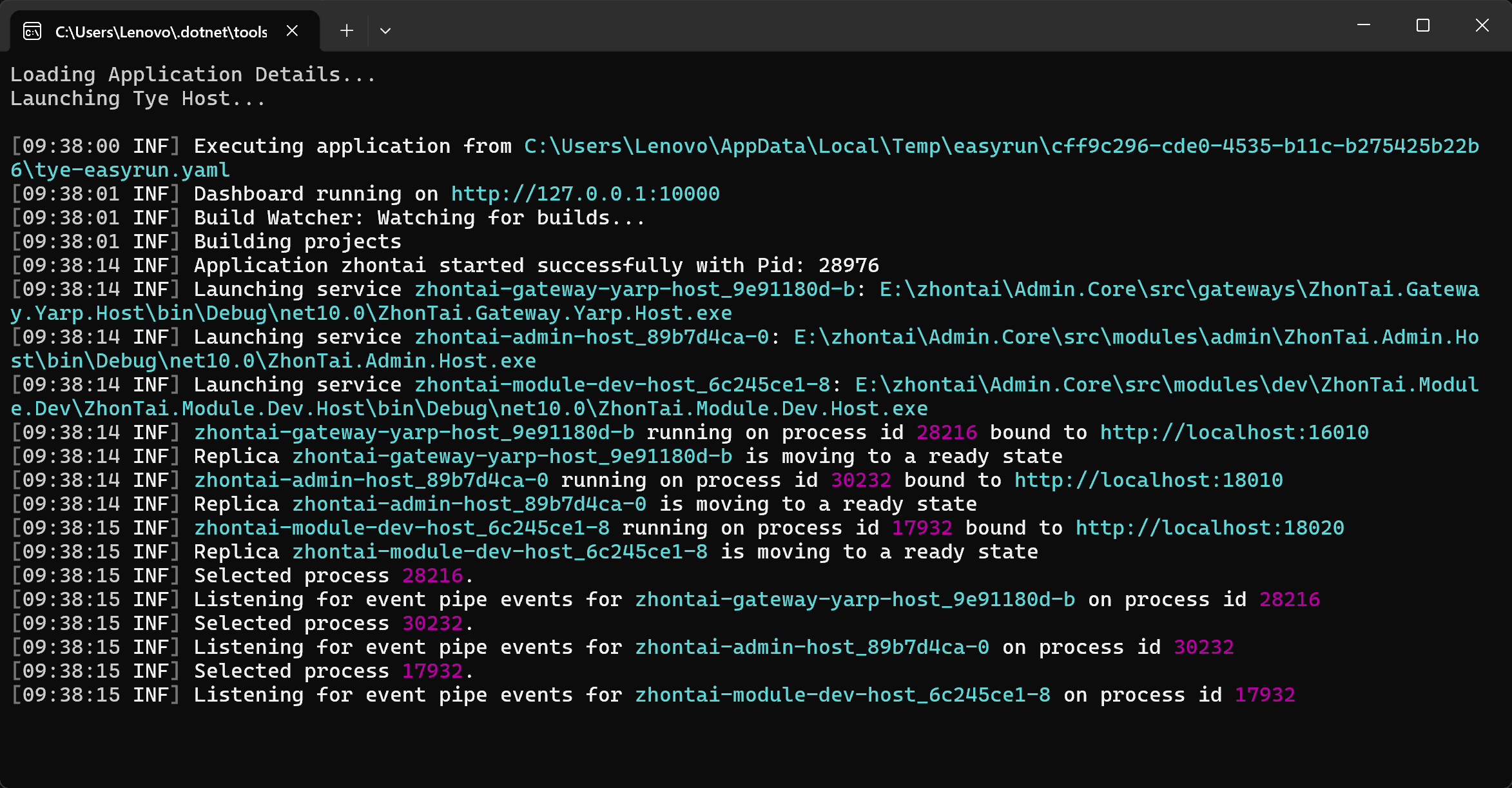
Visit http://127.0.0.1:10000 to view the zhontai-admin-host project runtime logs
Debug Project
Among the projects running in the EasyRun tab, select the project you want to debug and click the Debugger button to start debugging
Running Multiple Projects with VS
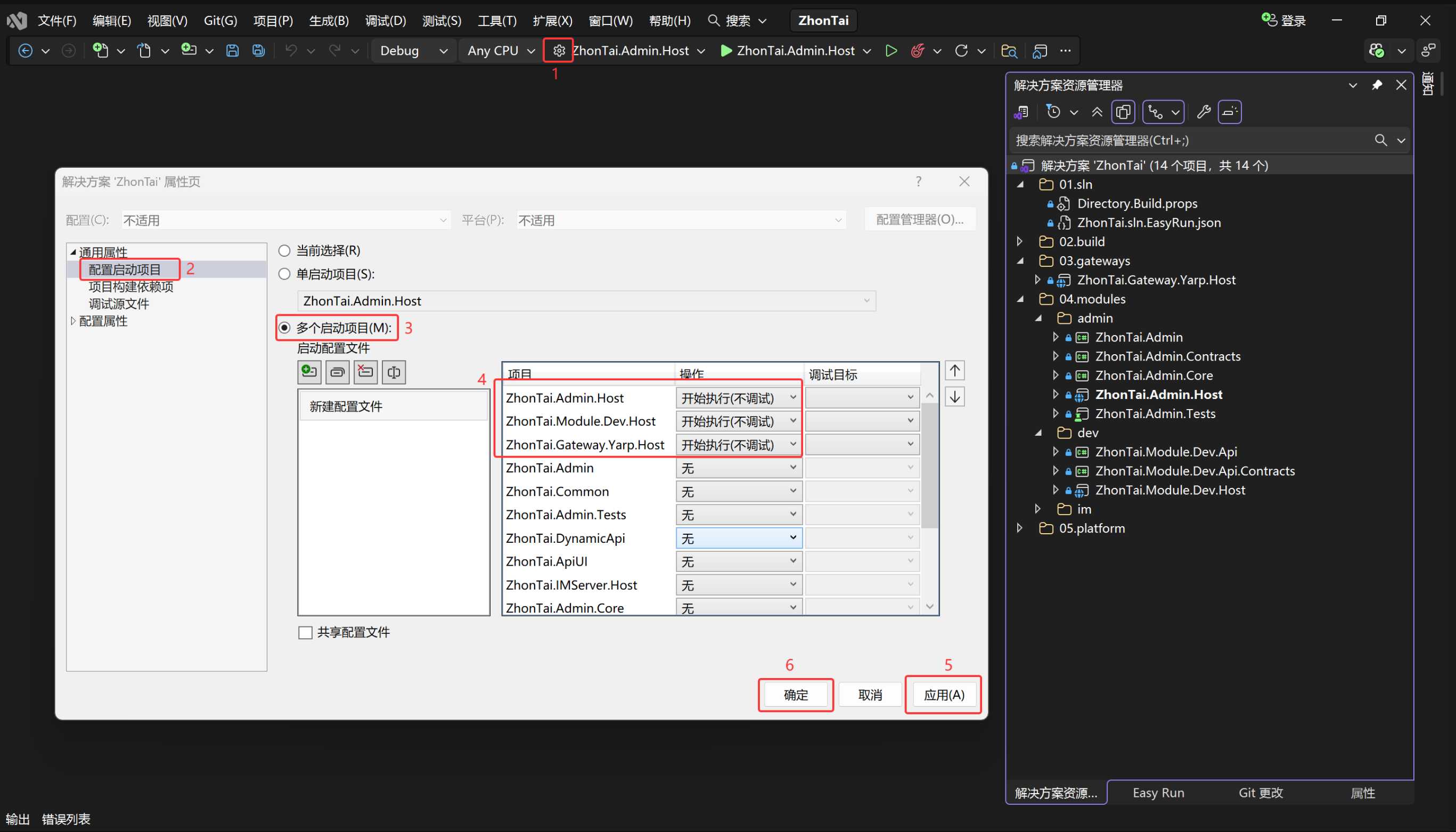
When not using EasyRun to run projects, you need to manually configure multiple startup projects through the VS toolbar
After configuring as shown below, press Ctrl + F5 to start executing (without debugging) multiple projects